






Digital Business Cards in Mobile Wallet
An easy way to share contacts without retyping
-
 21. 4. 2026
-
 7 min read
Paper business cards still have their place. They feel natural at meetings or conferences, and people are used to them. However, in practice, they often end up forgotten in a pocket, wallet, or at the bottom of a bag.
PassMachine's digital business card addresses the same need in a more modern way. It helps people quickly share contacts without manual transcription and without the need to carry paper cards.
What is a digital business card from PassMachine
A PassMachine digital business card is an electronic company business card that an employee stores in their mobile wallet, i.e., Apple Wallet or Google Wallet.
At first glance, it works similarly to a classic business card. It contains a name, job title, phone number, email, company, or website. The difference is that it's not printed on paper. It's stored on the phone in the mobile wallet and can be easily shared.
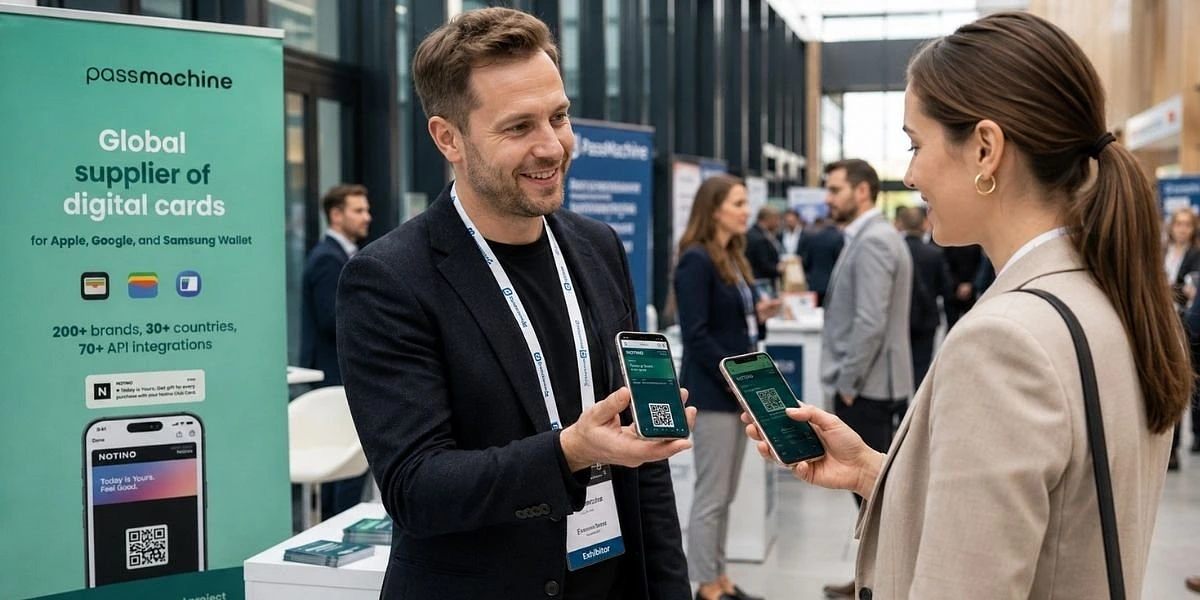
During an in-person meeting, the employee shows a QR code. The other person scans it, and their contact details are pre-filled into their phone. They just need to save the contact. They don't have to type anything manually.
This is useful when a company wants its employees to share contacts quickly, uniformly, and without unnecessary errors.
The digital business card is prepared in the company's design. Typically, its design includes the logo, company colors, and perhaps even an employee's photo. This makes it stand out from an ordinary phone contact and appear as part of the company's presentation. Another advantage is that it can be easily updated. If a phone number, position, or email changes, there's no need to print new cards. The information is updated digitally.
How a digital business card works in practice
Do you need salespeople to easily share their contact information at meetings? Do you want to ensure customers save the correct phone number, email, and job title? What if an employee changes their number, department, or role? Or do you want the entire team to have business cards in the same corporate design, but you don't want to keep reprinting them? This is precisely where a digital business card makes sense.
The company creates business cards for people who frequently represent the brand externally. Typically, this includes salespeople, consultants, HR teams, management, real estate agents, event teams, or employees at branches.
Each employee receives their business card via email. They add it to Apple Wallet or Google Wallet and always have it at hand. Just like a payment card, ticket, or boarding pass.
At a meeting, they simply open the business card on their phone and show the QR code. The other person scans it and saves the contact. The whole process takes a few seconds.
A digital business card is also useful outside of in-person meetings. A consultant can include it in their email signature. An HR specialist can send it to a candidate after an interview. A salesperson can share it after an online meeting. Management can use it when representing the company at a conference.
The advantage is simplicity. People don't have to search for a paper business card. They don't have to dictate a phone number. They don't have to worry about whether the other person has typed the email address correctly.
How to create a digital business card
Creating a digital business card is not a complex IT project. The company sets up the business card's appearance according to its identity directly within the PassMachine platform. They add the logo, colors, and the basic structure of the information.
Then, individual business cards are created for each employee.
This can be done in several ways. Companies can upload employees in bulk using a CSV file. If the company has its own system, it can also connect business card creation via API. Alternatively, a web form can be used.
After creation, the business cards are sent to employees. They save them to their mobile wallet and can start using them immediately. Employees also receive a link that they can insert into their standard email signature. Thanks to the digital format, any modification is possible at any time without complex data exchange or reprinting; the link to the business card and the QR code are always up-to-date.
This is particularly practical for companies where contact information or positions change frequently. Or where a uniform visual standard needs to be maintained across the team.
Main advantages of a digital business card
A digital business card is more than just a 'paper business card in your phone.' It offers practical benefits.
- Quick contact sharing: Simply show a QR code, send a link, or add the business card to your email signature.
- Fewer errors when saving: The contact is pre-filled into the phone. No need to retype email or phone number manually.
- Up-to-date information: When a position, phone number, or email changes, there's no need to print new business cards.
- Uniform company presentation: All business cards can have the same look, logo, and corporate style.
- Easier management: The company can create, edit, and distribute business cards centrally.
- Usage overview: The company can see how many employees have created a business card and who has saved it.
Back of the card and internal communication
A digital business card isn't just for sharing contact information. Its back side is also practical. The company can use it as a space for important links and information. This way, employees always have them readily available on their mobile phones.
The back of the business card can include, for example, links to the intranet, the company's Instagram, LinkedIn, internal documents, HR contacts, IT support, benefits, or current sales materials.
This is especially useful for larger teams. Employees don't have to search for important links in old emails or chats. They have them in one place.
A digital business card can also function as a simple internal communication channel. The company can send employees a short message as a notification directly to their phones. The message can be up to 160 characters. Notifications are great for short announcements. For example, a reminder about a company event, an alert about a new benefit, or information about updated materials.
An example of such a message could be:
New benefit: starting in May, you can use a transportation subsidy. Details can be found on the intranet.
Or:
We have updated the sales presentation. The new version can be found on the back of the business card.
This is not a replacement for the entire intranet or an internal newsletter. It's more of a simple way to quickly get short, important information to people.
Interested in other digital cards?
A digital business card is just one type of card that can be created through PassMachine.
Similarly, companies can use other cards in Apple Wallet and Google Wallet. For example, membership cards, tickets, loyalty cards, stamp cards, or travel tickets. Each type of card addresses a slightly different situation. However, the principle is similar. Get an important card directly into your phone, where you always have it at hand, and you can communicate with it directly.
Less paper, simpler sharing
A digital business card is a simple tool for companies that want to share contacts more modernly and unify the presentation of their employees.
Employees have it stored on their phones. They can show it at meetings, send it as a link, or include it in their email signature. The other person saves the contact quickly and without retyping.
For the company, advantages also include simpler management, distribution, and less printing. Business cards can be created in bulk, edited digitally, and also used for internal links or short push notifications.
Thus, a digital business card is not just a more modern replacement for a paper card. It is a practical tool for everyday communication, sales, HR, and brand representation.
Would you like digital business cards for your team? Contact us, and we'll show you how they can work for your company.
Frequently Asked Questions
What is a digital business card?
A digital business card is an electronic version of a classic paper business card. It is stored in a mobile wallet (Apple Wallet or Google Wallet) and shared via QR code or link. The recipient saves the contact directly to their phone without manual retyping.
Additionally, it has smart features like data updates, a back side with useful links, or receiving notifications.
How is a digital business card shared?
Most commonly via QR code, a link in an email, or as part of an email signature.
Simply scan the QR code with your camera, and the contact details will be automatically pre-filled into your phone.
Does the other person need a special app?
No. A standard phone camera is sufficient for scanning the QR code. The recipient does not need any app or account.
Does the employee need an app?
No. To use the business card, the native Apple or Google Wallet app is sufficient. The employee always has their business card at hand, on their phone.
Who is a digital business card suitable for?
Digital business cards are suitable for companies of all sizes, especially for salespeople, consultants, HR teams, management, or real estate agents – in short, for people who regularly represent the company externally and for whom sharing contacts is part of their daily work.
Can business cards be created for the entire team at once?
Yes. Employees can be uploaded in bulk via a CSV file, via an API connected to the company system, or manually through a web form.
However, they can also be created one by one gradually.
Can a digital business card be used online?
Yes. The business card can be included in an email signature, shared as a link after an online meeting, or sent to a candidate after an interview. The link to it can also be shared via SMS.
Is a digital business card only for sharing contacts?
Not only. The back of the business card can contain internal links, company documents, or HR information. The company can also send employees short push notifications directly to their phones. It has all the functions of digital cards.