






Digital Membership Cards
Benefits, membership, and direct communication
-
 28. 3. 2026
-
 8 min read
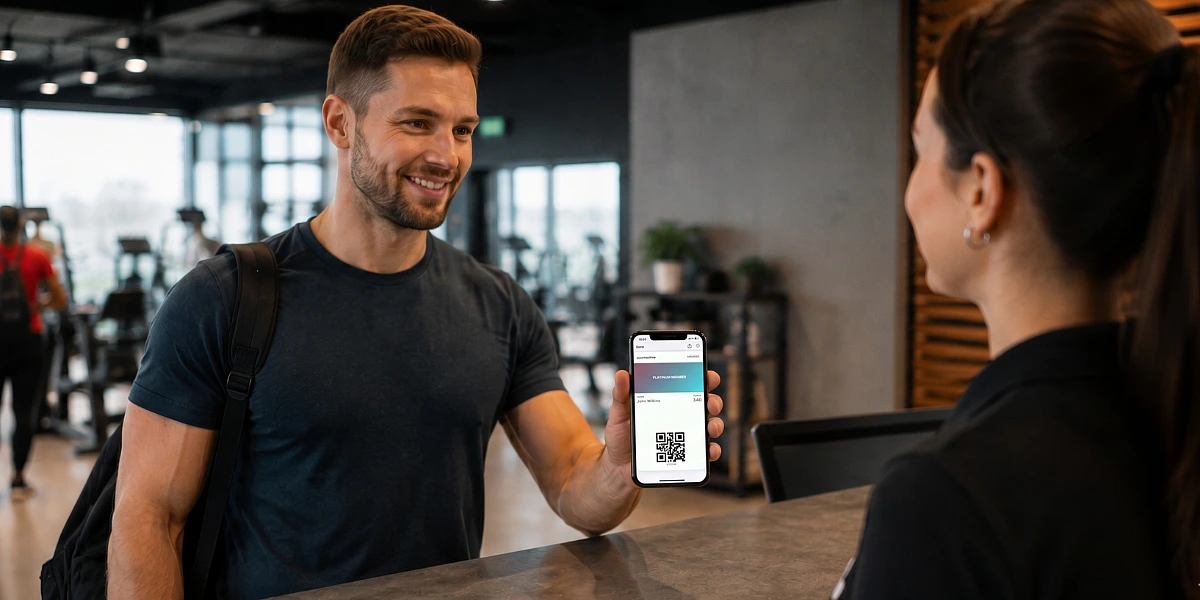
In practice, however, a plastic card often brings unnecessary administration. It has to be produced, sent out, updated, and reprinted if the details or design change. The PassMachine digital membership card transfers the same principle to mobile. Your customer stores it in Apple Wallet or Google Wallet, and you can manage it online.
What is a PassMachine Digital Membership Card
A PassMachine digital membership card is an electronic card that a customer saves to their mobile wallet, i.e., Apple Wallet or Google Wallet.
At first glance, it works similarly to a regular membership card. It contains the name, membership number, membership type, validity, membership level, QR code, EAN code, or information about available benefits. The difference is that it's not physical. The customer has it directly on their phone.
The card can be used for simple identification. The customer shows it upon entry, at reception, at the checkout, or when claiming a benefit. The organization verifies their membership based on the code or the data on the card.
The digital membership card is prepared in the organization's design. It includes your logo, colors, graphics, and texts according to your visual identity. This makes it appear as a natural part of the brand, not an anonymous card on the phone.
A major advantage is the simple management and editing of cards. When the design, program name, membership level, or validity changes, there's no need to issue new plastic cards. The data is edited in the administration, and the card is immediately updated for all members.
How a Digital Membership Card Works in Practice
Do you need customers to always have their membership card with them? Do you want to easily verify if someone has an active membership? What if the validity, benefits, opening hours, or the visual style of the entire organization changes? Or do you need to communicate differently with regular customers, VIP customers, and people whose membership is expiring soon? It is precisely in these situations that a digital membership card makes sense.
Whether it's an association, club, sports organization, fitness center, cultural institution, community, professional association, or a company with an internal benefit program, anyone can easily create membership cards for their customers.
Each customer receives a link or QR code to download the card. They add it to Apple Wallet or Google Wallet, and they always have it handy. Just like a payment card, ticket, or boarding pass.
When using it, the customer opens the card on their phone and presents it. The organization can verify their membership, level, validity, or entitlement to a specific benefit based on the code.
The card can also be used for communication. For example, when membership is nearing its end, a new benefit is added, or opening hours change. The customer receives a short notification directly on their phone.
Segmentation is also important. Organizations don't have to send the same message to everyone. They can communicate differently with new customers, long-term members, VIP customers, or people whose membership is about to expire.
How to Create a Digital Membership Card
Creating a digital membership card is not a complicated process. First, you set up the card's appearance according to your brand. Add your logo, colors, typography, and the basic layout of the information.
Then, you create specific cards for individual customers or members.
Cards can be created manually, in bulk, or automatically. You can start via a web form or upload members in bulk using a CSV file. If you already have your own membership system or CRM, card creation can be integrated via API.
Each card will have a unique page with a download link and QR code. The link can be sent via email, SMS, user account, or registration form.
The customer opens the card and saves it to their mobile wallet. From then on, they can use it.
Practically, one membership card can be stored on up to three devices. This is useful when a customer uses a personal and work phone, or wants to have the card available on another device.
Card management is then done in the administration panel. Here you can see members, their statuses, benefits, and other information. If something changes, there's no need to create a new card. Just edit the information online.
Main Advantages of a Digital Membership Card
- Simple Identification: Members identify themselves with the card on their phone. The organization quickly verifies their details.
- Up-to-date Information: Validity, status, benefits, or membership level can be edited digitally and instantly.
- Easy Management and Lower Costs: Cards can be created, edited, and distributed from one place. Eliminates repeated printing of plastic cards and costs associated with changes.
- Communication Segmentation: Different messages can be sent to different groups of customers or members.
- Usage Overview: The organization can see the number of active cards, wallet saves, and trends over time.
Front and Back of the Membership Card
Like a business card[1], a digital membership card has a front and a back. The front is mainly for quick identification. It can display the name, membership number, membership type, validity, QR code, or information about benefits.
The back carries supplementary information. The back of the membership card can include, for example, a link to the member section, intranet, organization's website, overview of benefits, membership rules, event calendar, contact information for support, or social media.
For associations, clubs, and membership organizations, this is particularly useful because the card remains up-to-date. If a rebranding occurs, contacts change, or a new section is added to the website, there's no need to manage new distribution. Edits are made in the administration, and the card is updated.
Communication via Membership Card
A digital membership card can also function as a simple communication channel. Organizations can send short messages to customers or members in the form of push notifications directly to their phones. A message can be up to 160 characters long.
An example message could be:
New benefit for members: 20% discount on entry this weekend. Details on the back of the card.
Or:
Today we have adjusted opening hours. We are open until 6:00 PM. Thank you for your understanding.
The ability to segment is also useful. A new customer can receive a different message than a VIP member, and someone whose membership expires in a few days can receive another. This way, communication can be more precise and less intrusive.
Another option is location-based notifications up to 100 meters. These can be triggered when a customer is near a specific location. For example, when they approach a branch or a partner location, they might receive an alert: the customer is near a partner cafe, and they get a reminder to use their membership discount. Or they approach a sports complex, and the card displays information about the day's program.
This is not a replacement for a full newsletter or member portal. It's more of a quick way to deliver short, relevant information directly to people.
Interested in Other Digital Cards?
A digital membership card is just one type of card that can be created through PassMachine.
Similarly, companies and organizations can use other cards in Apple and Google Wallet. For example, digital business cards, tickets, loyalty cards, stamp cards, or travel tickets.
Each type of card has a different use. But the principle is similar. Get an important card directly into your mobile, where you always have it with you.
Saving Time, Plastic, and Effort
A digital membership card is a practical tool for organizations that want to easily manage customers, members, benefits, and membership communication.
The member or customer stores it on their mobile. They can present it upon entry, at the checkout, at reception, or when claiming a benefit. The organization can edit the card, change information, and send short messages.
For clubs, associations, and membership programs, the main advantage is its up-to-dateness. When the design, validity, benefits, or operational information changes, there's no need to issue new cards. An edit in the administration is sufficient.
Therefore, a digital membership card is not just a more modern replacement for a plastic ID. It's a simple way to have your membership on your mobile, work better with customers, and keep important information constantly up-to-date.
Want digital membership cards for your organization? Contact us, and we'll show you how they can work in your membership program.